Treating your AI assistant like an actual co-worker completely changes the game—especially when managing message limits and keeping token usage lean.
Every time you send a message, the AI re-reads the entire conversation history from the start. Long threads with small "hey, quick question" messages drain your rate limits fast. Getting the most value out of your setup requires working smarter, not longer.
---
1. Master the "One-Shot" Prompt
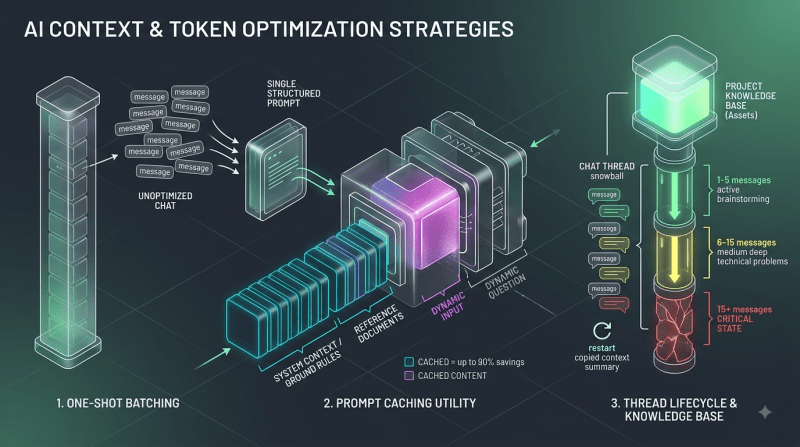
Sending four separate messages consumes four times the tokens compared to grouping them into one well-structured prompt.
- Instead of this:
"Can you check this python code?"
"Sure, send it over!"
"Here it is..."
"Here are the issues..."
"Can you fix line 12?"
- Do this:
"Review this Python code for bugs and edge cases. Focus specifically on error handling around line 12, and rewrite the fixed version in full: [Paste Code]"
---
2. Put Static Context First (Trigger Prompt Caching)
Modern AI systems use prompt caching to dramatically cut down on token costs—often reducing cached input costs by up to 90%. However, caching only triggers if the beginning of your prompt stays identical across messages.
- The Rule: Order your prompt as
System Context / Ground Rules$\rightarrow$Reference Documents$\rightarrow$Dynamic Question. - Avoid: Don't put dynamic information—like timestamps, changing project names, or random greetings—at the very start of your message. That breaks the cache and forces the system to re-process the entire prompt at full price.
---
3. Leverage Project Knowledge Bases
Uploading files individually into every single chat burns through your limit fast. Instead:
- Create dedicated Projects or Workspaces for ongoing tasks.
- Store core reference material (codebases, brand guides, research PDFs) directly in the project's knowledge base.
- The system caches these assets once. Every subsequent question asked inside that project hits the cached layer, consuming a fraction of your session limits.
---
4. Know When to Start a Fresh Thread
As a chat thread grows, it acts like a snowball rolling downhill—every new message carries the weight of all previous messages behind it.
| Chat Length | Token Burden | What to Do |
| --- | --- | --- |
| 1–5 Messages | Low | Great for active brainstorming and quick tweaks. |
| 6–15 Messages | Medium | Good for deep technical problems. |
| 15+ Messages | Critical | Start a new thread. Ask the AI to summarize key context from the old thread, copy it over, and start fresh. |
---
5. Give explicit output constraints
You pay for the tokens the AI generates in return, not just the text you send. Unconstrained output wastes usage on fluff.
Tell the AI directly: "Give me bullet points only," "Keep the response under 150 words," or "Provide only the code block without markdown introductions."*
- Short, punchy outputs preserve your generation quota while keeping answers easy to scan.
---
6. Quick Cheat-Sheet for Daily Tasks
- Coding: Include the full file snippet, environment details (Python version, OS, libraries), and the exact error log in Message 1.
- Writing & Editing: Send the complete draft along with your target audience, tone guidelines, and key constraints upfront rather than editing section by section.
- Research: Ask the AI to outline the high-level concepts first, then zero in on the specific section you actually need expanded.
FAQs
1. Why does my usage limit drain so quickly, even with short messages?
AI models don't just process your latest message; they re-read the entire conversation history from the very beginning with every new turn. A 10-message thread means the system re-processes previous turns repeatedly, rapidly consuming your quota.
2. What is prompt caching, and how does it save tokens?
Prompt caching allows AI systems to store static context—like code repositories, project guides, or system instructions—so it doesn't have to be re-processed from scratch every turn. Using cached content can reduce input token costs and consumption by up to 90%.
3. How should I structure my messages to trigger prompt caching effectively?
Keep all static, unchanging information at the very beginning of your prompt (e.g., standard rules, reference docs) and place dynamic content (like your specific question or today's date) at the very end. Changing anything at the start of a prompt breaks the cache.
4. What is the "One-Shot" prompting method?
It is the practice of combining your task, reference context, constraints, and target output format into a single comprehensive message instead of using back-and-forth conversational steps to build up to an answer.
5. How often should I start a brand-new chat thread?
As a general rule, once a thread reaches 15–20 back-and-forth messages, the token payload per message becomes heavily inflated. Have the AI write a quick summary of current progress, copy that summary, and paste it into a fresh chat to reset your token overhead.
6. Do output lengths affect my token limits as much as input lengths?
Yes, generated tokens count toward your overall plan usage limits. Adding constraints like "bullet points only," "no conversational intro," or "limit answer to 150 words" stops the AI from generating unnecessary text and preserves your quota.
7. Is it better to use Project Knowledge bases or upload files directly to a chat?
Using Project Knowledge bases is far more efficient. Files uploaded to a project are indexed and cached once across all chats in that workspace, whereas attaching files directly into individual chats re-loads them into the active context window repeatedly.