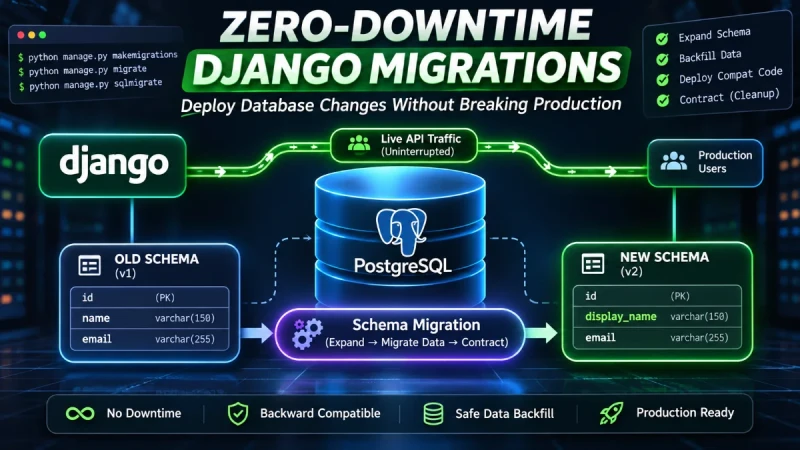
A database migration that works perfectly on your local machine can become a production incident when your application is handling thousands of requests.
Imagine you have a Django application running in production. Your database contains millions of records, users are continuously accessing APIs, and your application is deployed across multiple workers.
Now you need to rename a column, change a field type, or restructure an existing database table.
You write a migration, run:
``bash
`
python manage.py migrate
`
The migration completes, but suddenly your API starts returning 500 errors. Some application instances are still using the old database schema, while others expect the new one.


This is one of the most overlooked problems in production Django deployments.


The problem isn't always the migration itself. It's the compatibility between your running application and the database schema during deployment.


This is where zero-downtime database migrations become important.


In this article, we'll understand how to perform production-safe database migrations in Django using backward-compatible schema changes, the expand-and-contract pattern, batched data migrations, and PostgreSQL-specific optimizations.


1. Why Traditional Django Migrations Can Cause Downtime


Django provides a powerful migration system that allows developers to track and apply database schema changes.


For smaller applications, the normal workflow is straightforward:
bash
`
python manage.py makemigrations
python manage.py migrate
`
However, production environments introduce additional challenges.


Consider an existing model:
python
`
class UserProfile(models.Model):
name = models.CharField(max_length=150)
email = models.EmailField(unique=True)
name
Now, your product requirements change. You want to replace with display_name.
`
A developer might simply update the model:
python
`
class UserProfile(models.Model):
display_name = models.CharField(max_length=150)
email = models.EmailField(unique=True)
name
Then generate and apply the migration.


The problem is that a normal deployment is not necessarily an atomic operation across your application servers and database.


During a rolling deployment, different application instances can temporarily run different versions of your code.


For example:


| Application instance | Expected database column |

|---|---|

| Old application | |
display_name
| New application | |
display_name
| Database after rename | |
name
The old application instances will fail because the column no longer exists.
name
This can result in:
There is another issue: some database schema operations can acquire locks that block normal queries.
For example, building a regular index on a heavily used PostgreSQL table can block writes until the operation completes.
Therefore, simply making migrations faster is not enough.
We need migrations that remain compatible with both old and new application versions.
2. Understanding the Expand-and-Contract Pattern
The expand-and-contract pattern is one of the most useful techniques for achieving zero-downtime database migrations.
Instead of changing the existing database structure in one deployment, we divide the change into multiple backward-compatible stages.
The approach has three primary phases:
Phase 1: Expand
First, introduce the new database structure without removing the existing one.
For example, instead of renaming , add a new nullable column called display_name.
`
python
`
class UserProfile(models.Model):
name = models.CharField(max_length=150)
display_name = models.CharField(
max_length=150,
null=True,
blank=True
)
`
Generate the migration:
bash
`
python manage.py makemigrations
python manage.py migrate
`
At this stage, both columns exist:
text
`
user_profile
-------------------------
id
name
display_name
email
`
The existing application continues working because the old column is still available.


The new column is simply an addition.


Phase 2: Migrate Data and Application Logic


Now update your application to support the new column.


During the transition, new writes should keep both columns synchronized.


For example:
python
`
def update_user_profile(user, name):
user.name = name
user.display_name = name
user.save(
update_fields=["name", "display_name"]
)
name
This ensures that both old and new application versions can access the information they expect.


Next, migrate existing records from to display_name.
display_name
Once the backfill is complete, deploy application code that reads from .
name
The important part is that the database must remain compatible with both application versions throughout the rollout.
Phase 3: Contract
After confirming that all application instances use the new column, remove references to the old column.
First, deploy code that no longer reads or writes .
`
Then remove the old field:
python
`
class UserProfile(models.Model):
display_name = models.CharField(max_length=150)
email = models.EmailField(unique=True)
`
Generate the final migration:
bash
`
python manage.py makemigrations
python manage.py migrate
`
The old column can now be safely removed.


The complete migration lifecycle
text
`
EXISTING DATABASE
|
v
EXPAND
Add display_name
Keep name
|
v
APPLICATION UPDATE
Write to both columns
|
v
DATA BACKFILL
Copy existing records
|
v
READ SWITCH
Application reads display_name
|
v
STOP OLD WRITES
Remove dependencies on name
|
v
CONTRACT
Drop name column
|
v
FINAL DATABASE
Only display_name remains
`
The biggest advantage is that no single deployment requires the application and database to change simultaneously.


3. Implementing Safe Database Migrations in Django


Let's look at some practical implementation techniques.


A. Add New Fields Without Breaking Existing Code


When introducing a new field into an existing production table, consider whether the field should initially be nullable.


For example:
python
`
class Order(models.Model):
customer_name = models.CharField(max_length=150)
customer_reference = models.CharField(
max_length=100,
null=True,
blank=True
)
`
This avoids immediately requiring existing records to have a value for the new field.


After deploying the compatible application code, populate the existing records and introduce stricter constraints in a later migration.


Avoid combining schema changes, data backfills, and destructive operations into one large migration.


B. Perform Large Data Migrations in Batches


One common mistake is updating millions of records in a single operation.


For example:
python
`
UserProfile.objects.update(
display_name=F("name")
)
`
This is simple, but a large update can generate substantial database load, hold locks for extended periods, and increase replication lag.


A better approach is to process records in smaller batches.


For large backfills, I prefer a resumable Django management command rather than making the entire operation part of a schema migration.


Example:
python
`
from django.core.management.base import BaseCommand
from django.db import transaction
from django.db.models import F
from accounts.models import UserProfile
class Command(BaseCommand):
help = "Backfill user display names"
def handle(self, args, *options):
batch_size = 1000
last_pk = 0
while True:
ids = list(
UserProfile.objects
.filter(
display_name__isnull=True,
pk__gt=last_pk
)
.order_by("pk")
.values_list("pk", flat=True)[:batch_size]
)
if not ids:
break
with transaction.atomic():
updated = (
UserProfile.objects
.filter(
pk__in=ids,
display_name__isnull=True
)
.update(display_name=F("name"))
)
last_pk = ids[-1]
self.stdout.write(
f"Processed through PK {last_pk}"
f" | Updated: {updated}"
)
self.stdout.write(
self.style.SUCCESS("Backfill completed.")
)
`
Run it separately:
bash
`
python manage.py backfill_display_names
atomic
There are several advantages:
For a production implementation, also consider adding configurable batch sizes, throttling, structured logging, and explicit progress checkpoints.
The important principle is to avoid unnecessarily long transactions when working with large datasets.
C. Use Non-Atomic Migrations When Appropriate
Django runs migrations inside transactions by default on databases that support transactional DDL, including PostgreSQL.
This is useful for ordinary schema changes, but large data operations may benefit from non-atomic migrations.
Django supports this through the migration attribute.
`
python
`
from django.db import migrations
class Migration(migrations.Migration):
atomic = False
dependencies = [
("accounts", "0005_previous_migration"),
]
operations = [
# Migration operations
]
CREATE INDEX CONCURRENTLY
You can also control transactions around individual operations.
However, disabling atomicity does not automatically make a migration safe. You must account for partial completion, retries, and idempotency.
For large production backfills, a separate management command is often easier to monitor and control.
D. Keep Database and Application Changes Backward Compatible
During deployment, your system may temporarily contain:
Therefore, backward compatibility must include more than HTTP API workers.
Pay attention to:
A migration is not ready for its contract phase until all relevant consumers have stopped depending on the old schema.
4. PostgreSQL Techniques for Production-Safe Migrations
If your Django application uses PostgreSQL, there are additional techniques worth understanding.
A. Create Indexes Concurrently
Creating an index on a large production table can affect normal database operations.
PostgreSQL provides , which allows regular inserts, updates, and deletes to continue during index creation.
AddIndexConcurrently
Django provides for this purpose.
`
Example:
python
`
from django.db import migrations, models
from django.contrib.postgres.operations import AddIndexConcurrently
class Migration(migrations.Migration):
atomic = False
dependencies = [
("orders", "0004_previous_migration"),
]
operations = [
AddIndexConcurrently(
model_name="order",
index=models.Index(
fields=["created_at"],
name="order_created_at_idx"
),
),
]
`
Notice the following:
python
`
atomic = False
CREATE INDEX CONCURRENTLY
This is required because PostgreSQL does not allow inside a transaction block.
lock_timeout
Concurrent index creation takes longer and has additional operational considerations, but it avoids the write-blocking behavior of a regular index build.
B. Use Lock Timeouts
Another useful PostgreSQL setting is .
`
It limits how long a statement waits to acquire a database lock.
For example:
sql
`
SET lock_timeout = '5s';
`
This can help prevent a migration from waiting indefinitely behind a conflicting transaction.


However, it is important to understand that a lock timeout does not make an unsafe migration safe.


It only limits the time spent waiting for locks.


For critical migrations, configure an appropriate timeout, monitor failures, and retry after investigating the conflicting transaction.


C. Avoid Adding NOT NULL Constraints Too Early


Suppose you want to introduce a required field:
python
`
phone_number = models.CharField(
max_length=15,
null=False
)
python manage.py sqlmigrate
Adding a required field to an existing table can be problematic when existing records do not have values.
A safer sequence is:
1. Add the field as nullable.
2. Deploy code that populates it for new records.
3. Backfill existing records.
4. Verify that no NULL values remain.
5. Introduce the NOT NULL constraint in a separate deployment.
For large PostgreSQL tables, constraint validation strategies can also reduce the impact of expensive table scans.
The exact locking behavior depends on the operation and PostgreSQL version, so inspect the generated SQL before running production migrations.
D. Understand That Not Every Migration Is Online
Some operations are inherently more complicated than others.
| Database operation | Production consideration |
|---|---|
| Add nullable column | Usually a good additive change |
| Add index concurrently | Allows normal writes during index creation |
| Rename column | Can break old application instances |
| Drop column | Unsafe while any application still references it |
| Large data update | Prefer batched backfill |
| Add NOT NULL | Backfill and validate first |
| Change field type | May require data conversion and compatibility planning |
The objective is not to avoid every database lock.
The objective is to understand which operations acquire locks, how long they may take, and whether application traffic can continue safely.
5. Production Deployment Checklist and Common Questions
Before applying a database migration to a live Django application, use this checklist.
Production Migration Checklist
.
RunPython
Frequently Asked Questions
1. Does Django support zero-downtime database migrations natively?
Django provides a migration framework, transaction handling, , RunSQL, and PostgreSQL-specific migration operations.
RunPython`.
However, zero downtime is primarily an application deployment and database compatibility strategy. Django does not automatically make every migration safe for a running production application.
2. Is the expand-and-contract pattern necessary for every migration?
No.
For a small, additive change that is backward compatible, a single migration may be sufficient.
Expand-and-contract is especially valuable for destructive changes, column renames, field type changes, and large table restructures.
3. Can I run Django migrations while users are accessing my application?
Yes. Many migrations can run while the application is serving traffic.
However, you must understand the locking behavior of the database operation and ensure that the running application versions remain compatible with the resulting schema.
4. Should data migrations be included in Django migration files?
Small, deterministic data migrations are suitable for
For large backfills involving millions of records, a separate resumable management command or background job often provides better control over batching, monitoring, and retries.
5. Does zero downtime mean there will never be database errors?
No.
It means the deployment strategy is designed to keep the application available while schema changes happen.
Lock contention, connection exhaustion, failed backfills, application bugs, and infrastructure failures can still occur.
Final Thoughts
Database migrations are easy when an application is small and nobody is using it.
They become an engineering challenge when your application has millions of records, multiple workers, continuous API traffic, and rolling deployments.
The biggest mistake is treating a production migration as a simple database operation.
A successful migration requires coordination between three things:
1. The database schema.
2. The currently running application.
3. The application version being deployed.
The expand-and-contract pattern provides a practical way to coordinate all three without requiring them to change simultaneously.
My recommendation: Stop treating production database migrations as one-time deployment commands. Design them as a sequence of backward-compatible changes, validate each stage, and remove old structures only when nothing depends on them.
That is the difference between simply running migrations and engineering reliable production deployments.