A Django application can handle thousands of API requests, but what happens when all those requests start competing for database connections?
Imagine your Django application is running with multiple Gunicorn workers. Each worker handles incoming requests, and every request may need to communicate with PostgreSQL.
Initially, everything works fine. But as traffic increases, you start noticing:
- Too many active PostgreSQL connections.
- Increased database memory consumption.
- Connection timeout errors.
- Slow API response times during traffic spikes.
- PostgreSQL reaching its
max_connectionslimit.
At this point, adding more application workers might actually make the situation worse.
The problem is not necessarily your database queries. It could be the way your application manages database connections.
One practical solution is database connection pooling using PgBouncer.
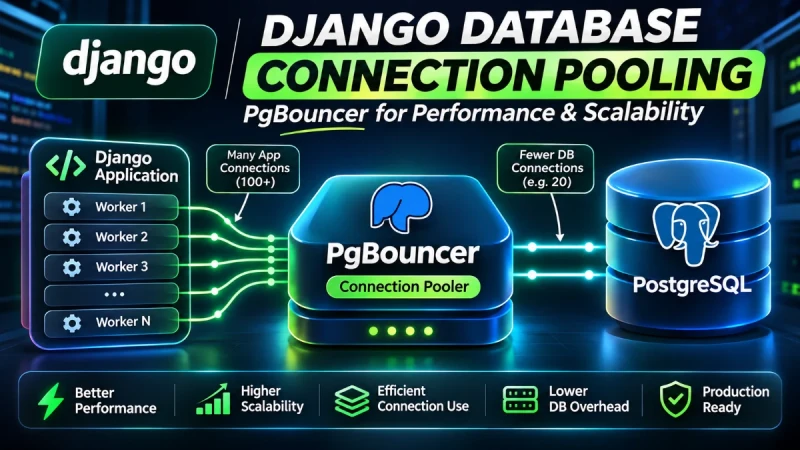
PgBouncer sits between Django and PostgreSQL, allowing multiple application connections to reuse a smaller number of actual database connections.
In this article, we'll understand how connection pooling works, why Django applications need it, how to configure PgBouncer with PostgreSQL, and how to optimize the setup for production workloads.
1. Understanding Database Connection Pooling
Before introducing PgBouncer, let's understand how Django normally communicates with PostgreSQL.
Whenever Django needs to execute a database query, it uses a database connection.
A simplified architecture looks like this:
``
text

              CLIENT REQUESTS

                     |

                     v

              DJANGO APPLICATION

                     |

          +----------+----------+

          |          |          |

          v          v          v

       Worker 1   Worker 2   Worker 3

          |          |          |

          v          v          v

       PostgreSQL PostgreSQL PostgreSQL

       Connection Connection Connection

          |          |          |

          +----------+----------+

                     |

                     v

                DATABASE
`
Each application process can establish its own database connections.


When you increase the number of workers, threads, or application instances, the potential number of database connections also increases.


For example:


| Application instances | Workers per instance | Potential connections |

|---|---:|---:|

| 1 | 4 | 4 |

| 2 | 4 | 8 |

| 5 | 4 | 20 |

| 10 | 8 | 80 |

| 20 | 8 | 160 |


These are simplified estimates assuming one connection per worker. Actual connection counts depend on threads, database aliases, background workers, and connection lifecycle settings.


PostgreSQL has a configurable maximum connection limit:
`sql
SHOW max_connections;
`
You can also inspect the number of currently established connections:
`sql
SELECT
state,
COUNT(*)
FROM pg_stat_activity
GROUP BY state;
`
When the application starts creating more connections than PostgreSQL can efficiently handle, performance can degrade.


What is connection pooling?


Connection pooling solves this problem by maintaining a reusable collection of database connections.


Instead of opening a new PostgreSQL connection for every application interaction, the application borrows an existing connection from a pool.


The connection is returned to the pool when it is no longer needed.


This reduces repeated connection establishment and allows multiple application clients to share a smaller number of database server connections.


What is PgBouncer?


PgBouncer is a lightweight connection pooler specifically designed for PostgreSQL.


It acts as an intermediary between your Django application and PostgreSQL.


The architecture changes to:
`text
CLIENT REQUESTS
|
v
DJANGO APPLICATION
|
+--------+--------+
| | |
v v v
Worker 1 Worker 2 Worker 3
| | |
+--------+--------+
|
v
PGBOUNCER
|
+-------+-------+
| | |
v v v
DB Conn DB Conn DB Conn
| | |
+-------+-------+
|
v
POSTGRESQL
`
Here, Django can maintain many client connections to PgBouncer, while PgBouncer controls how many actual server connections are established with PostgreSQL.


This is particularly useful when multiple application processes need database access but PostgreSQL has limited connection capacity.


2. How PgBouncer Works: Understanding Pooling Modes


PgBouncer supports three primary pooling modes.


Understanding these modes is important because they determine when a PostgreSQL connection becomes available for another application client.


A. Session Pooling


In session pooling, PgBouncer assigns a PostgreSQL connection to a client for the entire duration of its session.


When the client disconnects, the server connection returns to the pool.
`text
Django Client 1 --------> PostgreSQL Connection 1
Django Client 2 --------> PostgreSQL Connection 2
Django Client 3 --------> PostgreSQL Connection 3
`
This mode provides compatibility with PostgreSQL session-level features.


However, it does not provide the same connection-sharing benefits as transaction pooling.


Use it when application compatibility is more important than maximizing connection reuse.


B. Transaction Pooling


Transaction pooling is generally the most useful mode for typical Django web applications.


In this mode, PgBouncer assigns a PostgreSQL connection to a client only while a transaction is running.


Once the transaction completes, the connection becomes available to another client.
`text
DJANGO CLIENTS
+--------+--------+
| | |
v v v
Client 1 Client 2 Client 3
| | |
+--------+--------+
|
v
PGBOUNCER
|
PostgreSQL Pool
|
+--------+--------+
| | |
v v v
Conn 1 Conn 2 Conn 3
`
For example, imagine 100 Django clients are connected to PgBouncer, but only 20 PostgreSQL connections are available.


If only a few clients are actively executing transactions at a time, PgBouncer can reuse those 20 server connections across many clients.


This significantly reduces the number of PostgreSQL connections required.


However, transaction pooling has an important limitation: session state does not necessarily persist between transactions.


Features such as session-level
SET commands, temporary tables, session advisory locks, and LISTEN subscriptions require special attention.
C. Statement Pooling
Statement pooling releases the PostgreSQL connection after each individual statement.
It does not allow transactions spanning multiple statements.
This mode is generally unsuitable for Django applications because Django frequently uses multi-statement transactions, particularly with transaction.atomic().
Which mode should you use with Django?
| Pooling mode | Connection reuse | Django compatibility |
|---|---|---|
| Session | Low | High |
| Transaction | High | Good with configuration |
| Statement | Very high | Generally unsuitable |
For most conventional Django API applications, transaction pooling is a strong starting point.
However, you must account for server-side cursors and session-dependent PostgreSQL features.
3. Installing and Configuring PgBouncer with Django
Let's implement PgBouncer in a Django and PostgreSQL environment.
We'll assume the following architecture:
`text
Django Application
|
| Port 6432
v
PgBouncer
|
| Port 5432
v
PostgreSQL
`
Step 1: Install PgBouncer


On Ubuntu, install PgBouncer using:
`bash
sudo apt update
sudo apt install pgbouncer -y
`
Check the installed version:
`bash
pgbouncer --version
`
PgBouncer commonly listens on port 6432, while PostgreSQL listens on port 5432.
Step 2: Configure PgBouncer
Open the configuration file:
`bash
sudo nano /etc/pgbouncer/pgbouncer.ini
`
Add a basic configuration:
`ini
[databases]
mydatabase = host=127.0.0.1 port=5432 dbname=mydatabase
[pgbouncer]
listen_addr = 127.0.0.1
listen_port = 6432
auth_type = scram-sha-256
auth_file = /etc/pgbouncer/userlist.txt
pool_mode = transaction
max_client_conn = 500
default_pool_size = 20
min_pool_size = 5
reserve_pool_size = 5
reserve_pool_timeout = 5
server_idle_timeout = 600
server_lifetime = 3600
log_connections = 1
log_disconnections = 1
`
Let's understand some important parameters.


| Parameter | Purpose |

|---|---|

|
listen_addr | Address where PgBouncer accepts connections |
| listen_port | PgBouncer listening port |
| pool_mode | Defines how server connections are reused |
| max_client_conn | Maximum client connections accepted |
| default_pool_size | Maximum server connections per user/database pool |
| min_pool_size | Minimum server connections maintained under applicable conditions |
| reserve_pool_size | Additional server connections available when needed |
| server_idle_timeout | Closes unused server connections after the configured period |
| server_lifetime | Maximum lifetime of a server connection |
One important distinction:
max_client_conn is not the maximum number of PostgreSQL connections.
It controls how many client connections PgBouncer can accept.
The actual number of PostgreSQL connections is controlled by pool sizing and database/user limits.
Step 3: Configure Database Authentication
Open the authentication file:
`bash
sudo nano /etc/pgbouncer/userlist.txt
`
Add the database username and its password in the format supported by the configured authentication method.


For example:
`text
"django_user" "SCRAM-SHA-256$..."
`
Use the appropriate SCRAM verifier generated for your PostgreSQL user. Do not place an ordinary plaintext password in this example format.


Secure the authentication file:
`bash
sudo chown postgres:postgres /etc/pgbouncer/userlist.txt
sudo chmod 600 /etc/pgbouncer/userlist.txt
`
Ensure the PostgreSQL role and PgBouncer authentication configuration use compatible credentials.


For production, also configure network restrictions and TLS where traffic crosses an untrusted network.


Step 4: Start PgBouncer


Restart the service:
`bash
sudo systemctl restart pgbouncer
`
Enable it at startup:
`bash
sudo systemctl enable pgbouncer
`
Check its status:
`bash
sudo systemctl status pgbouncer
`
PgBouncer should now be listening on port 6432.
Step 5: Connect Django to PgBouncer
Now update the Django database configuration.
Instead of connecting Django directly to PostgreSQL on port 5432, connect it to PgBouncer on port 6432.
In your settings.py:
`python
import os
DATABASES = {
"default": {
"ENGINE": "django.db.backends.postgresql",
"NAME": os.getenv("DB_NAME"),
"USER": os.getenv("DB_USER"),
"PASSWORD": os.getenv("DB_PASSWORD"),
"HOST": os.getenv("DB_HOST", "127.0.0.1"),
"PORT": os.getenv("DB_PORT", "6432"),
"CONN_MAX_AGE": 0,
"DISABLE_SERVER_SIDE_CURSORS": True,
"CONN_HEALTH_CHECKS": True,
}
}
`
Example environment variables:
`env
DB_NAME=mydatabase
DB_USER=django_user
DB_PASSWORD=your_secure_password
DB_HOST=127.0.0.1
DB_PORT=6432
`
There are two particularly important settings here.


1.
CONN_MAX_AGE = 0
With transaction pooling, Django should not depend on persistent connections holding a PostgreSQL server session.


Using
CONN_MAX_AGE = 0 avoids relying on persistent Django-side connections in this configuration.
2. DISABLE_SERVER_SIDE_CURSORS = True
Django uses server-side cursors in certain operations, including QuerySet.iterator().
These cursors belong to a particular PostgreSQL connection.
In transaction pooling mode, the next transaction might receive a different PostgreSQL connection. This can cause cursor-related errors.
Disabling server-side cursors is a straightforward solution for the main pooled connection.
If your application needs server-side cursors, consider a separate direct or session-pooled database connection for those operations.
Step 6: Test the Connection
You can test PgBouncer directly:
`bash
psql -h 127.0.0.1 \
-p 6432 \
-U django_user \
-d mydatabase
`
Then check the active PostgreSQL connection:
`sql
SELECT
current_database(),
current_user,
inet_server_port();
`
From Django, test database connectivity:
`bash
python manage.py shell
`
`python
from django.db import connection
with connection.cursor() as cursor:
cursor.execute("SELECT 1")
print(cursor.fetchone())
`
If the query returns (1,), the connection is working.
You can now run your application through PgBouncer.
4. Optimizing PgBouncer for Django Performance and Scalability
Installing PgBouncer is only the first step.
The actual performance improvement depends on how you configure the connection pool and how your Django application behaves under load.
A. Understand Connection Limits
Suppose your production infrastructure looks like this:
`text
Django Application
|
|-- Gunicorn: 4 workers
|
|-- Celery: 3 workers
|
|-- Scheduler: 1 process
|
v
PgBouncer
|
v
PostgreSQL
`
Your application may create connections from several independent processes.
If you configure each process without considering the total connection requirement, you can still exhaust database resources.
For example:
| Component | Processes | Potential connections |
|---|---:|---:|
| Gunicorn | 4 | 4 |
| Celery | 3 | 3 |
| Scheduler | 1 | 1 |
| Total | 8 | 8 |
These are illustrative estimates, not guaranteed limits. Threads, connection aliases, and other processes can increase the total.
With PgBouncer, these application clients can share a smaller server connection pool.
However, you must calculate the pool capacity across all PgBouncer instances, databases, and users.
For example, if you have:
- 2 PgBouncer instances.
- 20 connections per database/user pool.
- 1 database and 1 user.
Your potential server connection allocation is approximately:
`text
2 × 20 = 40 PostgreSQL connections
`
Additional pools, reserve connections, and other applications must also be accounted for.


B. Configure Pool Size According to Database Capacity


A common mistake is setting
default_pool_size too high.
For example:
`ini
default_pool_size = 100
`
This may look like a performance optimization, but it can simply move the connection exhaustion problem from Django to PostgreSQL.


Instead, calculate the available connection budget.


For example:
`text
PostgreSQL max_connections = 150
Reserved/admin connections = 20
Other applications = 20
Available for Django/PgBouncer = 110
`
You could start with a smaller allocation, such as:
`ini
default_pool_size = 20
reserve_pool_size = 5
`
Then benchmark and adjust it based on actual traffic.


Remember that pool sizes are generally applied per user/database combination, not as one global limit across every pool.


C. Monitor PgBouncer Statistics


PgBouncer provides an administrative database called pgbouncer.
Connect to it:
`bash
psql -h 127.0.0.1 \
-p 6432 \
-U pgbouncer_admin \
-d pgbouncer
`
Useful commands include:
`sql
SHOW POOLS;
`
Shows information about active pools, including client and server connections.
`sql
SHOW CLIENTS;
`
Shows connected application clients.
`sql
SHOW SERVERS;
`
Shows PostgreSQL server connections managed by PgBouncer.
`sql
SHOW STATS;
`
Shows aggregated statistics, including transaction and query activity.


Pay particular attention to:
cl_waiting: Clients waiting for a server connection.
sv_active: Server connections currently active.
sv_idle: Available idle server connections.
maxwait: How long the oldest waiting client has been waiting.
Transaction and query rates.
If clients regularly wait for server connections, your pool might be too small for the workload, or transactions might be taking too long.
Increasing the pool is not always the answer. First investigate slow queries and long-running transactions.
D. Avoid Long-Running Transactions
Consider this example:
`python
from django.db import transaction
@transaction.atomic
def process_order(order_id):
order = Order.objects.get(id=order_id)
# Perform database operations
# External API call
call_external_payment_api()
# More database operations
order.status = "completed"
order.save()
`
The external API call happens while the database transaction is open.


This means the PostgreSQL connection remains occupied for longer than necessary.


Under heavy traffic, these long transactions can reduce the effective capacity of your connection pool.


A better approach is to keep transactions short and move external operations outside the database transaction where the business workflow permits it.


For example:
`python
from django.db import transaction
def process_order(order_id):
with transaction.atomic():
order = Order.objects.select_for_update().get(
id=order_id
)
order.status = "processing"
order.save(update_fields=["status"])
# Database transaction has completed.
call_external_payment_api(order_id)
`
This is an illustrative restructuring. Real payment workflows should also account for payment idempotency, failures, and state reconciliation.


The important principle is simple:


Do not hold database connections while waiting for unrelated external operations.


E. Be Careful With Prepared Statements


Prepared statements can improve query execution efficiency, but transaction pooling changes how PostgreSQL connections are reused.


PgBouncer versions 1.21.0 and later support tracking protocol-level prepared statements in transaction pooling when
max_prepared_statements is configured to a non-zero value.
For example:
`ini
max_prepared_statements = 100
`
This is not the same as enabling arbitrary SQL-level session prepared statements.


Review your driver and PgBouncer versions before enabling this feature.


F. Understand Django's Native Connection Pooling


An important addition to the Django ecosystem is native connection pooling support through Psycopg.


Django 5.1 introduced support for connection pooling using psycopg-pool.
For example:
Install the required package:
`bash
pip install "psycopg[pool]"
`
Configure Django:
`python
DATABASES = {
"default": {
"ENGINE": "django.db.backends.postgresql",
"NAME": "mydatabase",
"USER": "django_user",
"PASSWORD": "your_password",
"HOST": "127.0.0.1",
"PORT": "5432",
"CONN_MAX_AGE": 0,
"OPTIONS": {
"pool": {
"min_size": 2,
"max_size": 10,
"timeout": 10,
},
},
}
}
`
This enables Psycopg's connection pool inside Django.
There is an important architectural difference:
- Django/Psycopg pooling manages connections inside individual application processes.
- PgBouncer provides a separate connection-pooling layer between application clients and PostgreSQL.
Native pooling can be sufficient for smaller deployments.
PgBouncer becomes particularly useful when multiple application instances and background workers need to share a limited PostgreSQL connection budget.
You should not blindly stack both pooling layers. Doing so adds complexity and makes total connection capacity harder to predict.
If you use both, explicitly calculate their limits and understand the connection lifecycle at each layer.
5. Performance Testing, Deployment Considerations and Common Questions
Adding PgBouncer does not automatically make every API faster.
Its primary benefit is efficient connection management, particularly when the application creates more client connections than PostgreSQL should maintain.
To understand whether it improves your infrastructure, benchmark the application before and after integration.
A. Compare Direct PostgreSQL vs PgBouncer
Test two configurations:
Configuration 1: Direct Connection
`text
Django
|
v
PostgreSQL
`
Configuration 2: PgBouncer
`text
Django
|
v
PgBouncer
|
v
PostgreSQL
`
Use the same:
- API endpoint.
- Database records.
- Application workers.
- Concurrent users.
- Test duration.
- Hardware resources.
Measure the following metrics:
| Metric | What it tells you |
|---|---|
| Average response time | General API performance |
| P95 latency | Experience of slower requests |
| P99 latency | Worst-case response behavior |
| PostgreSQL connections | Database connection consumption |
| Active transactions | Actual database workload |
| Waiting clients | Pool contention |
| Database CPU | Database processing load |
| Error rate | Connection and application reliability |
| Throughput | Requests handled per second |
A useful Locust test could look like this:
`python
from locust import HttpUser, task, between
class APIUser(HttpUser):
wait_time = between(0.5, 2)
@task
def get_blogs(self):
self.client.get(
"/api/blog/",
name="Blog API"
)
`
Run it with:
`bash
locust -f locustfile.py \
--host=https://your-domain.com
`
Compare the results across both database configurations.


For a meaningful test, also monitor PgBouncer and PostgreSQL statistics while the test is running.


B. Production Deployment Considerations


Before deploying PgBouncer, consider these points:


1. Database migrations


Django migrations should generally use a direct PostgreSQL connection or a dedicated migration connection when appropriate.


This avoids transaction-pooling limitations affecting schema operations.


2. Background workers


Celery workers and scheduled tasks must also connect through the intended pooling architecture.


Do not optimize Gunicorn connections while ignoring background processes.


3. Network security


Do not expose PgBouncer's administrative interface or database port publicly without appropriate authentication and network restrictions.


4. Connection monitoring


Monitor both the number of client connections and the number of actual PostgreSQL server connections.


5. Failure handling


If PgBouncer becomes unavailable, Django database requests will fail. Run it as a supervised service and consider high availability if the application requires it.


Frequently Asked Questions


1. Does PgBouncer improve Django API response time?


It can improve response times when connection establishment overhead or PostgreSQL connection contention is a bottleneck.


However, it does not optimize SQL queries or automatically reduce query execution time.


2. Is PgBouncer necessary for every Django application?


No.


A small Django application with a few workers and a manageable number of database connections may work perfectly well without it.


PgBouncer becomes more valuable as application instances, workers, concurrent connections, and database connection pressure increase.


3. What is the difference between PgBouncer and Django CONN_MAX_AGE?
CONN_MAX_AGE` controls how long Django keeps database connections open.
PgBouncer manages a separate pool of PostgreSQL server connections and allows multiple client connections to reuse them.
They solve related but different connection-management problems.
4. Can I use PgBouncer with Celery?
Yes.
Celery workers can connect to PostgreSQL through PgBouncer, just like Django web workers.
However, configure connection handling carefully for long-running workers and ensure they do not retain unnecessary connections.
5. Does PgBouncer cache database queries?
No.
PgBouncer is a connection pooler, not a query cache.
It manages database connections and reduces connection overhead. Query caching and query optimization require separate approaches.
6. Should I use PgBouncer or Psycopg's native connection pooling?
It depends on your architecture.
Psycopg pooling is useful for managing connections within Django application processes.
PgBouncer is particularly useful when several application processes or services need to share a centralized PostgreSQL connection pool.
Final Thoughts
Database scalability is not just about increasing PostgreSQL resources or adding more Django workers.
As your application grows, connection management becomes an important part of production architecture.
A Django application with multiple Gunicorn workers, Celery processes, scheduled tasks, and background services can create significant database connection pressure.
PgBouncer helps solve this problem by separating application-side connections from actual PostgreSQL server connections.
My recommendation is to start by measuring your existing connection usage, identify whether connection pressure is a real bottleneck, and introduce PgBouncer with transaction pooling when your application architecture supports it.
Do not increase pool sizes blindly. Monitor waiting clients, active transactions, query latency, and PostgreSQL resource consumption before making adjustments.
A scalable Django application is not one that opens more database connections. It is one that manages its database resources efficiently.