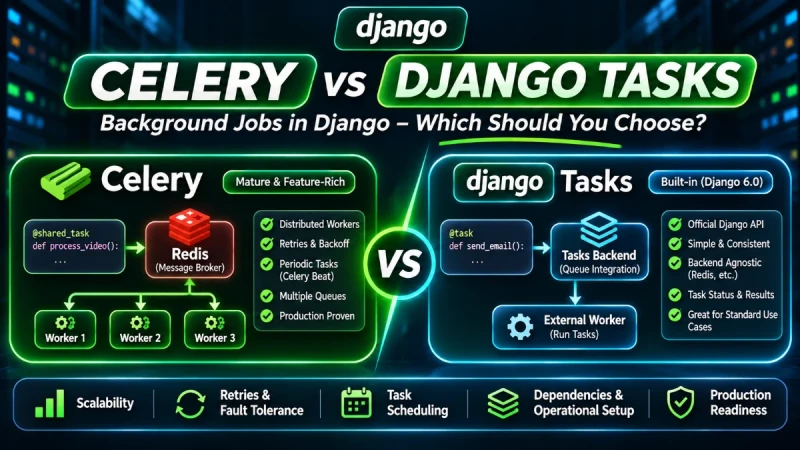
A Django application does not always finish its work when an HTTP request is received.
Consider a user uploading a video to your platform. After receiving the file, your backend may need to:
- Generate video thumbnails.
- Extract audio.
- Process the video.
- Generate metadata.
- Send email notifications.
- Update search indexes.
- Notify other services.
If all these operations execute inside the same HTTP request, the user has to wait until everything finishes.
This increases API response times, consumes application worker capacity, and can eventually affect the performance of your entire application.
A better approach is to move time-consuming operations outside the request-response lifecycle using background tasks.
For years, Celery has been one of the most popular solutions for background job processing in Django applications.
However, Django 6.0 introduced something interesting: its own built-in Tasks framework.
This raises an important question:
Do we still need Celery, or is Django's new Tasks framework enough for production applications?
Let's understand both approaches, implement them, compare their architectures, and identify which one makes sense for different application requirements.
1. Why Django Applications Need Background Tasks
Django follows a request-response architecture.
When a client sends an HTTP request, Django processes it and returns an HTTP response.
For operations that finish quickly, this works perfectly.
However, some operations take considerably longer.
Consider a video-processing API:
``
python

from rest_framework.views import APIView

from rest_framework.response import Response


class VideoUploadAPIView(APIView):


    def post(self, request):


        video = request.FILES["video"]


        # Save uploaded video

        video_path = save_video(video)


        # Process video

        extract_audio(video_path)


        # Generate thumbnail

        generate_thumbnail(video_path)


        # Send notification

        send_processing_email(request.user.email)


        return Response({

            "message": "Video processed successfully"

        })
`
This implementation has a problem.
Every operation executes before Django returns the response.
If video processing takes 30 seconds, the HTTP request might remain active for approximately that long.
During this time:
- The application worker remains occupied.
- The client waits for a response.
- Request timeouts become more likely.
- Concurrent requests compete for available workers.
Instead, we can separate the work.
Moving work outside the request-response cycle
`text
CLIENT REQUEST
|
v
DJANGO API
|
v
Save Video
|
v
Queue Background Job
|
v
Return HTTP Response
|
|
v
BACKGROUND WORKER
|
+---------+---------+
| | |
v v v
Extract Generate Send Email
Audio Thumbnail
`
Now the API only needs to accept the upload, save the file, and enqueue the processing job.
The background worker handles the expensive operations independently.
This is the fundamental idea behind background task processing.
2. What Is Celery?
Celery is a distributed task queue designed to execute background jobs across one or more worker processes or machines.
It is widely used in Django applications for:
- Sending emails.
- Processing images and videos.
- Generating reports.
- Running scheduled jobs.
- Calling external APIs.
- Processing large datasets.
- Handling notifications.
- Executing recurring tasks.
Celery separates task producers from task consumers.
A Django application creates a task message and sends it to a message broker.
The broker stores the message until a Celery worker receives and executes it.
Celery architecture
`text
DJANGO APPLICATION
|
v
TASK PRODUCER
|
v
MESSAGE BROKER
(Redis/RabbitMQ)
|
+---------+---------+
| | |
v v v
Worker 1 Worker 2 Worker 3
| | |
+---------+---------+
|
v
TASK EXECUTION
|
v
RESULT BACKEND
(Optional)
`
There are several components here.
1. Task Producer
The Django application that creates and sends tasks.
2. Message Broker
Stores and distributes task messages.
Common choices include:
- Redis
- RabbitMQ
3. Celery Workers
Independent processes that consume tasks and execute Python functions.
4. Result Backend
An optional storage system for task execution results and states.
Redis and database-backed result storage are common options.
An important distinction: the message broker and result backend solve different problems. The broker transports tasks; the result backend stores execution results.
Why Celery is popular
Celery provides a mature task-processing ecosystem.
Some of its important capabilities include:
- Automatic retries.
- Task scheduling.
- Periodic tasks through Celery Beat.
- Multiple queues.
- Task routing.
- Worker concurrency.
- Task priorities.
- Rate limits.
- Monitoring and inspection.
- Distributed worker execution.
This makes Celery suitable for applications where background processing is a major part of the system architecture.
3. What Is Django Tasks?
Django 6.0 introduced a built-in Tasks framework.
Before this release, Django developers generally depended on external libraries such as Celery, Django Q, Huey, or RQ for background job processing.
The new Tasks framework provides a standardized interface for defining, enqueueing, and tracking background work.
However, there is an important architectural distinction:
Django Tasks does not include its own production worker system or production-ready queue backend.
It provides the task definition and queue integration contract. Actual execution is delegated to external infrastructure and a compatible backend.
Django Tasks architecture
`text
DJANGO APPLICATION
|
v
TASK DEFINITION
|
v
TASK BACKEND
|
v
QUEUE STORE
|
v
EXTERNAL WORKER
|
v
TASK EXECUTION
|
v
RESULT STATUS
`
Django provides a consistent API for describing and enqueueing tasks.
The backend determines how tasks are stored and how they are made available for execution.
This separation allows developers to use compatible external backends without tying their task definitions to a particular queue implementation.
Important features
The Django Tasks framework includes:
- A
@task decorator.
Task enqueueing through .enqueue().
Named queues.
Task priorities, where supported by the backend.
Delayed execution, where supported by the backend.
Task execution status.
Task result retrieval, where supported by the backend.
Synchronous and asynchronous backend interfaces.
For example:
`python
from django.tasks import task
@task
def send_notification(email, message):
print(f"Sending notification to {email}")
return {
"email": email,
"status": "sent"
}
`
Enqueue the task:
`python
send_notification.enqueue(
email="user@example.com",
message="Your account has been created."
)
`
Notice how simple the interface is.


You define a task using Django's decorator and enqueue it without directly depending on a particular broker API.


However, the configured backend must actually support background execution for this to run asynchronously.


Django's built-in
ImmediateBackend executes tasks immediately, while DummyBackend is intended for testing. Neither provides a production background worker system.
This distinction is important when evaluating Django Tasks for production.
4. Implementing Background Tasks: Celery vs Django Tasks
Let's implement the same functionality using both approaches.
We'll use a practical example: sending an email after a user registers.
A. Implementing Background Tasks with Celery
First, install Celery and Redis.
`bash
pip install celery redis
`
Start Redis:
`bash
docker run -d \
--name redis \
-p 6379:6379 \
redis:7
`
Step 1: Create a Celery application


Inside your Django project, create:
config/celery.py
`python
import os
from celery import Celery
os.environ.setdefault(
"DJANGO_SETTINGS_MODULE",
"config.settings"
)
app = Celery("config")
app.config_from_object(
"django.conf:settings",
namespace="CELERY"
)
app.autodiscover_tasks()
`
Step 2: Initialize Celery in Django


Update config/__init__.py:
`python
from .celery import app as celery_app
__all__ = ("celery_app",)
`
This ensures that Celery is initialized when the Django project loads.


Step 3: Configure Redis


Add the following to settings.py:
`python
CELERY_BROKER_URL = (
"redis://127.0.0.1:6379/0"
)
CELERY_RESULT_BACKEND = (
"redis://127.0.0.1:6379/1"
)
CELERY_ACCEPT_CONTENT = ["json"]
CELERY_TASK_SERIALIZER = "json"
CELERY_RESULT_SERIALIZER = "json"
CELERY_TIMEZONE = "Asia/Kolkata"
`
For production, keep credentials and connection details in environment variables.


Step 4: Create a background task


Inside your application, create tasks.py:
`python
from celery import shared_task
from django.core.mail import send_mail
@shared_task(
bind=True,
max_retries=3
)
def send_registration_email(
self,
email
):
try:
send_mail(
subject="Welcome to Our Platform",
message="Your registration was successful.",
from_email="noreply@example.com",
recipient_list=[email]
)
return {
"status": "success",
"email": email
}
except Exception as exc:
raise self.retry(
exc=exc,
countdown=60
)
`
Here:
shared_task defines a Celery task.
bind=True gives access to the task instance.
max_retries=3 limits retry attempts.
self.retry() schedules another execution after failure.
Step 5: Execute the task
Inside your registration API:
`python
from .tasks import send_registration_email
def register_user(email):
# Create user account
send_registration_email.delay(email)
return {
"message": "Registration successful."
}
`
The .delay() method sends the task to the configured broker.
The API does not wait for the email to be sent.
Step 6: Start the Celery worker
Run:
`bash
celery -A config worker \
--loglevel=info
`
Now the worker listens for tasks and executes them.


For scheduled jobs, you can also use Celery Beat:
`bash
celery -A config beat \
--loglevel=info
`
This gives you a complete background processing system with independent workers and scheduling infrastructure.


B. Implementing Background Tasks with Django Tasks


Now let's implement the same functionality using Django 6.0's Tasks framework.


Step 1: Define a task


Create accounts/tasks.py:
`python
from django.core.mail import send_mail
from django.tasks import task
@task
def send_registration_email(email):
send_mail(
subject="Welcome to Our Platform",
message="Your registration was successful.",
from_email="noreply@example.com",
recipient_list=[email]
)
return {
"status": "success",
"email": email
}
`
The @task decorator registers the function as a Django Task.
Step 2: Configure the Tasks backend
Django uses the TASKS setting to configure task backends.
For example:
`python
TASKS = {
"default": {
"BACKEND": (
"django.tasks.backends.immediate.ImmediateBackend"
),
},
}
`
This is useful for development, but remember that the immediate backend executes the task in the calling process.


It does not provide asynchronous background processing.


For production, you need a compatible third-party backend that supplies durable queueing and worker execution.


A production backend can be configured through its import path:
`python
TASKS = {
"default": {
"BACKEND": "your_backend_module.YourBackend",
"QUEUES": ["default"],
"OPTIONS": {},
},
}
`
The backend must implement Django's Tasks backend contract and provide the necessary execution infrastructure.


The example above is a configuration template, not an installable backend.


Step 3: Enqueue the task


Inside your registration API:
`python
from accounts.tasks import send_registration_email
def register_user(email):
# Create user account
result = send_registration_email.enqueue(
email=email
)
return {
"message": "Registration successful.",
"task_id": result.id
}
`
The .enqueue() method creates a task through the configured backend.
Django Tasks also supports retrieving task results when the backend implements that capability.
For example:
`python
result = send_registration_email.enqueue(
email="user@example.com"
)
print(result.id)
print(result.status)
`
The exact execution behavior depends on the configured backend.


Important: Django Tasks defines how tasks are represented and queued. You still need infrastructure to consume and execute those queued tasks.


C. Comparing the Implementation


| Feature | Celery | Django Tasks |

|---|---|---|

| Task definition |
@shared_task | @task |
| Enqueue task | .delay() / .apply_async() | .enqueue() |
| Built-in production workers | Celery workers | No |
| Message broker | Required | Depends on backend |
| Retry handling | Mature built-in support | Backend/application dependent |
| Periodic scheduling | Celery Beat | Backend dependent |
| Task priorities | Supported | Backend dependent |
| Multiple queues | Yes | Supported through backend |
| Task result tracking | Result backend | Backend dependent |
| Distributed execution | Yes | Depends on backend |
| Production ecosystem | Mature | Newer framework |
The most important difference is not the syntax.
It is the infrastructure and capabilities available around each framework.
5. Celery vs Django Tasks: Which Should You Use in Production?
Both approaches solve the problem of moving work outside Django's request-response cycle, but they target different levels of task-processing infrastructure.
Let's compare them from a production engineering perspective.
A. Performance and Scalability
Celery is designed for distributed task processing.
You can run multiple workers across multiple machines and distribute tasks between them.
For example:
`text
DJANGO APPLICATION
|
v
REDIS
|
+----------+----------+
| | |
v v v
Worker 1 Worker 2 Worker 3
| | |
v v v
Emails Videos Reports
`
This makes it suitable for high-volume applications where background jobs are a significant part of the workload.
Django Tasks provides a standardized task interface, but its actual scalability depends on the backend and worker infrastructure you choose.
It would be incorrect to assume that Django Tasks is automatically slower or faster than Celery. Performance depends on the queue backend, broker, worker implementation, serialization, task duration, and concurrency settings.
B. Reliability and Retry Handling
Background tasks can fail for many reasons:
- External APIs become unavailable.
- Network connections time out.
- Database transactions fail.
- Workers restart unexpectedly.
- Third-party services return errors.
Celery provides mature retry and task execution options, but you still need to configure acknowledgements, late acknowledgements, visibility timeouts where applicable, and idempotent task behavior correctly.
Django Tasks exposes a common interface, but production reliability depends on the selected backend and its execution guarantees.
For critical business operations, neither framework removes the need for idempotent tasks.
C. Scheduling and Periodic Jobs
Consider an application that needs to:
- Send daily reports.
- Delete expired sessions.
- Process pending transactions.
- Generate weekly analytics.
- Send reminders.
Celery Beat provides an established scheduling mechanism for periodic tasks.
Django Tasks includes the ability to specify run_after where the configured backend supports delayed execution.
However, delayed execution and recurring scheduling are not the same thing. For recurring schedules, you still need a scheduler or compatible backend.
D. Operational Complexity
Celery introduces additional infrastructure:
- Redis or RabbitMQ.
- Celery worker processes.
- Optional result backend.
- Celery Beat for scheduled tasks.
- Monitoring and operational tooling.
Django Tasks provides a more standardized interface and may reduce application-level coupling to a particular backend.
But it does not eliminate the need for a production queue and worker infrastructure.
The operational complexity ultimately depends on the backend you select.
E. Which One Fits Different Projects?
| Project type | Recommended approach |
|---|---|
| Small Django application | Django Tasks with a suitable lightweight backend |
| Basic email notifications | Either |
| Image processing | Celery |
| Large video processing | Celery |
| Recurring scheduled jobs | Celery + Beat |
| Distributed workers | Celery |
| Large data processing | Celery |
| Standardized task API | Django Tasks |
| Complex retry workflows | Celery |
| Existing mature Celery infrastructure | Continue with Celery |
These are practical starting recommendations rather than hard technical restrictions.
F. Can You Use Both Together?
Yes, but there is an important distinction.
Django Tasks is not a replacement for Celery's worker engine.
You can use Django Tasks with a third-party backend that integrates with an existing task-processing system, provided that backend implements the required Django interface.
This can help standardize how tasks are defined and enqueued while retaining an external execution system.
However, do not assume Celery automatically acts as a Django Tasks backend. That integration requires a compatible adapter or backend implementation.
For many existing applications, keeping Celery directly is simpler than adding another abstraction layer.
6. Production Best Practices and Common Mistakes
Regardless of which framework you choose, some engineering principles apply to every background task system.
A. Pass IDs Instead of Large Objects
Avoid passing complete Django model objects into a task.
For example, instead of:
`python
process_order.delay(order)
`
Prefer:
`python
process_order.delay(order.id)
`
Then retrieve the object inside the worker.
`python
@shared_task
def process_order(order_id):
order = Order.objects.get(
id=order_id
)
# Process order
`
This reduces serialization problems and avoids sending unnecessarily large messages through the broker.


B. Use Idempotent Tasks


A background task might execute more than once because of retries, redelivery, or worker failures.


Therefore, task functions should be designed to handle repeated execution safely.


For example:
`python
@shared_task
def process_order(order_id):
order = Order.objects.get(
id=order_id
)
if order.status == "completed":
return
# Process order
`
For financial operations, a simple status check is not enough on its own. Use database constraints, atomic state transitions, and provider-supported idempotency where appropriate.


C. Enqueue Tasks After Database Commit


One common mistake is sending a task before the corresponding database record is committed.


For example:
`python
order = Order.objects.create(
user=request.user
)
process_order.delay(order.id)
`
A worker might receive the task before the database transaction commits.


Celery provides delay_on_commit():
`python
process_order.delay_on_commit(
order.id
)
`
Alternatively, use Django's transaction callback:
`python
from django.db import transaction
order = Order.objects.create(
user=request.user
)
transaction.on_commit(
lambda: process_order.delay(order.id)
)
`
For Django Tasks, the same principle applies:
`python
transaction.on_commit(
lambda: send_registration_email.enqueue(
email="user@example.com"
)
)
`
One important limitation: on_commit() prevents a worker from seeing uncommitted database data, but it does not guarantee that task publication succeeds after the transaction commits.
For critical workflows where losing a queued task is unacceptable, use a transactional outbox pattern.
D. Separate Queues by Workload
In Celery, different workloads can use separate queues.
For example:
`text
default
|
|-- Email notifications
media
|
|-- Video processing
reports
|
|-- PDF generation
high_priority
|
|-- Important business operations
`
This prevents a large video-processing job from delaying small email notifications.


You can run dedicated workers for each queue:
`bash
celery -A config worker \
-Q media \
--concurrency=2
``
E. Monitor Background Workers
A production system should monitor:
- Queue length.
- Task execution time.
- Failed task count.
- Retry count.
- Worker availability.
- Memory consumption.
- Task processing throughput.
- Oldest pending task age.
Celery provides monitoring and inspection capabilities, including integration with tools such as Flower.
Django Tasks result tracking depends on the selected backend.
F. Production Deployment Checklist
- [ ] Use a durable queue backend.
- [ ] Run workers independently from web processes.
- [ ] Configure task timeouts.
- [ ] Implement retries with backoff where appropriate.
- [ ] Make business operations idempotent.
- [ ] Pass primitive, serializable task arguments.
- [ ] Enqueue tasks after database commits.
- [ ] Use an outbox for critical event delivery.
- [ ] Separate long-running and short-running workloads.
- [ ] Monitor queue length and failed tasks.
- [ ] Configure worker restart and process supervision.
- [ ] Test worker crashes and broker outages.
Frequently Asked Questions
1. Is Django Tasks a replacement for Celery?
Not by itself.
Django Tasks provides a standardized interface for defining, enqueueing, and tracking background tasks. It does not include a production worker system or production-ready queue backend.
Celery remains a complete distributed task queue ecosystem with its own workers, broker integrations, scheduling, and operational tools.
2. Does Django 6.0 support background tasks natively?
Yes, Django 6.0 introduced the Tasks framework.
However, the built-in backends are intended for development and testing. Production execution requires compatible external infrastructure.
3. Can Django Tasks use Redis?
Yes, through a compatible third-party backend that uses Redis for queue storage and provides the required execution infrastructure.
Django does not provide a production Redis Tasks backend out of the box.
4. Is Celery faster than Django Tasks?
There is no universal answer.
Celery has a mature distributed execution architecture. Django Tasks is an interface whose performance depends on its backend.
A fair comparison requires benchmarking the actual backend, broker, workers, and task workload.
5. Can I use Celery with Django 5.x?
Yes. Celery supports integration with Django projects, including established Django versions.
You do not need to upgrade to Django 6.0 to use Celery.
6. Should I migrate an existing Celery application to Django Tasks?
Not necessarily.
If your existing Celery infrastructure is reliable and meets your requirements, there may be little benefit in migrating.
Evaluate Django Tasks when you need a standardized task interface or are building a new architecture that benefits from backend independence.
Final Thoughts
Background processing is an important part of building scalable Django applications.
As applications grow, operations such as email delivery, media processing, report generation, scheduled jobs, and external API integrations should not unnecessarily occupy HTTP request workers.
Celery has been a reliable choice for these requirements because it provides a complete task queue ecosystem with distributed workers, retries, scheduling, and operational tooling.
Django 6.0's Tasks framework introduces a standardized way to define and enqueue background work directly within Django.
However, it is important to understand that Django provides the task interface, not the complete production execution infrastructure.
My recommendation: If you are building a production Django application with complex background workflows, multiple workers, scheduled jobs, and significant processing requirements, Celery is still a strong choice. If you want a standardized task API and are comfortable selecting and managing an external backend, Django Tasks is worth evaluating.
The important thing is not choosing the newest framework. It is choosing an architecture that can execute jobs reliably, recover from failures, and scale independently of your API servers.