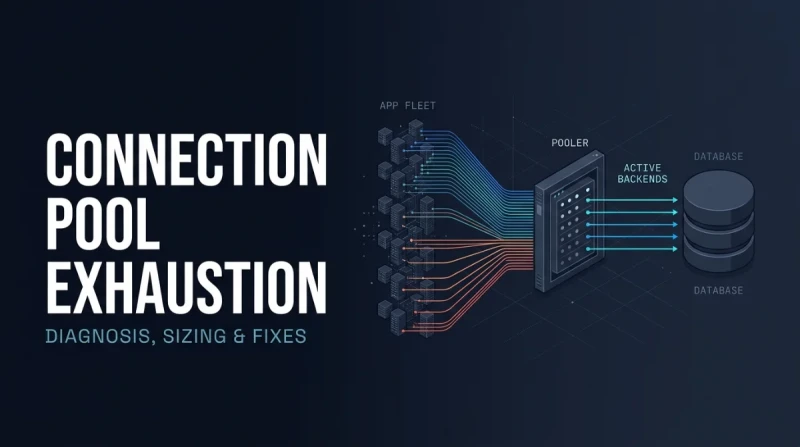
Connection pool exhaustion is one of the more common ways production systems fail under load. The symptoms are familiar: application requests hang or return 503s, threads pile up waiting for connections, and the database itself shows modest CPU and I/O. Operators frequently respond by raising pool size or max_connections. That response often makes the outage longer and the system slower once it recovers.
The root cause is almost always that connections are held longer than the database can usefully serve concurrent work, or that the total number of connections across the fleet exceeds what the database can handle efficiently. This article covers the mechanics, the dominant failure modes, correct sizing, configuration that prevents silent breakage, and the practical limits of the common fixes.
How Connection Pools Actually Work
Most applications do not open a new database connection for every request. Connection establishment is expensive (authentication, TCP, process startup on the database side). Application-level pools such as HikariCP keep a set of already-authenticated connections and hand them out. External poolers such as PgBouncer sit between the application and the database and multiplex many client connections onto a smaller number of real database backends.
PostgreSQL (and most databases) has hard limits. Each backend process consumes memory. Internal structures scale poorly with very large connection counts. The PostgreSQL wiki notes that once resources are saturated, additional connections reduce throughput because of lock contention, context switching, cache-line thrashing, and reduced effectiveness of
work_mem. The same wiki states that a database will usually complete a given volume of work faster with a modest number of concurrent connections than with hundreds.
PgBouncer’s official documentation defines three pooling modes. Session mode assigns a backend for the lifetime of the client connection (essentially no multiplexing). Transaction mode assigns a backend only for the duration of a transaction and returns it on commit or rollback. Statement mode is more aggressive still. Transaction mode is the one that actually reduces backend count for typical request/response workloads.
The Failure Modes That Produce Exhaustion
Long hold times. A connection is checked out for the entire duration of a query or transaction. Slow queries, missing indexes, lock waits, or application logic that holds a connection while making an external HTTP call all increase the number of connections required for the same arrival rate. Little’s Law makes this concrete: concurrent connections needed ≈ arrival rate × average hold time. Doubling hold time roughly doubles the connections required.
Connection leaks. A connection is borrowed and never returned (exception path that skips the close, missing
try-with-resources, framework misconfiguration). The pool permanently loses capacity. HikariCP’s leak-detection threshold exists precisely for this case.
Fleet-wide oversizing. Each application instance is given a pool of 20–50 connections. With 20 instances the database sees 400–1,000 potential connections. The PostgreSQL and HikariCP guidance is that the optimal number of active connections on the database is roughly
((core_count * 2) + effective_spindle_count). On a modern SSD-backed system with a mostly cached working set the spindle term is near 1. An 8-core database therefore wants something in the low tens of active connections, not hundreds. The excess simply creates contention.
Idle-in-transaction and connection storms. Sessions left in
idle in transaction hold backends. After a deploy or restart, every instance simultaneously opens its full pool, creating a thundering-herd of new connections that can itself exhaust max_connections before steady-state is reached.
Raising the pool size or
max_connections without addressing hold time simply moves the queue from the application into the database, where the cost is higher (memory, lock contention, slower plans).
Sizing Pools Correctly
Start from the database, not the application. The formula published on the PostgreSQL wiki and adopted by the HikariCP documentation is:
``
connections ≈ (core_count * 2) + effective_spindle_count
`
Core count excludes hyper-threads. Effective spindle count is near zero when the working set is cached; it rises only when random I/O is significant. Treat this number as the approximate optimum for active work on that database server. Always leave headroom in max_connections for superuser, monitoring, and migration connections (PostgreSQL reserves slots via superuser_reserved_connections).
Divide that total across every process that connects. If the calculated optimum is 20 and you have 10 application instances, each instance’s pool should be on the order of 2, not 20. In practice most teams introduce an external pooler (PgBouncer in transaction mode, or a managed equivalent) so that application instances can keep reasonably sized local pools while the number of real backends stays near the optimum.
Measure rather than only calculate. Look at the number of connections in active state under load (via pg_stat_activity) and at application-side pool wait time. If wait time is high while database CPU and I/O are not saturated, the pool is too small. If CPU is high, locks are contended, or latency rises as connections increase, the pool is too large.
Configuration That Prevents Silent Failures
For HikariCP (and equivalent pools) the settings that matter in production are:
maximumPoolSize sized from the calculation above (after division across instances or after accounting for a pooler).
connectionTimeout short enough to fail fast (a few seconds) rather than queue indefinitely.
maxLifetime set below the database’s idle_session_timeout / wait_timeout so the pool retires connections before the server silently closes them.
keepaliveTime or equivalent to detect dead connections.
Leak detection enabled at a threshold that matches your longest legitimate transaction.
A minimal production-oriented HikariCP fragment (Spring Boot style) looks like:
`yaml
spring:
datasource:
hikari:
maximum-pool-size: 10
minimum-idle: 10
connection-timeout: 5000
max-lifetime: 1800000
keepalive-time: 120000
leak-detection-threshold: 30000
`
For PgBouncer the essential lines are:
`ini
pool_mode = transaction
max_client_conn = 2000
default_pool_size = 25
reserve_pool_size = 5
max_prepared_statements = 200 # required for modern drivers in transaction mode
`
Transaction mode returns the backend at the end of each transaction. That is what allows hundreds or thousands of client connections to share a few dozen backends. It also means session-level state (SET, temporary tables that outlive a transaction, LISTEN/NOTIFY, session advisory locks) does not survive. Protocol-level prepared statements require a non-zero max_prepared_statements on PgBouncer 1.21+.
Never hold a database connection across an external call. Check the connection out, do the SQL, return it, then make the HTTP request. This single discipline eliminates a large class of exhaustion incidents.
Limitations and Trade-offs
Transaction-mode pooling is the highest-leverage fix for most web and API workloads, but it is not free. Any code that relies on session state will break intermittently under concurrency even if it works in single-user testing. Teams must audit for SET, temporary tables, and driver prepared-statement settings.
The PostgreSQL formula is a starting point, not a law. Heavy analytical queries, very high work_mem, or storage that is not cached will shift the optimum. Load-test around the calculated value.
External poolers add a hop and a new failure domain. They must themselves be monitored and sized, and their configuration (especially prepared-statement handling) must match the application drivers.
Implications and What to Do Next
Treat pool exhaustion as a symptom of hold-time or fleet-wide connection accounting problems, not as a capacity problem to be solved by larger numbers. Instrument three things:
1. Application pool wait time (time spent waiting to acquire a connection).
2. Database active vs idle connections and idle in transaction count.
3. Query duration percentiles and lock waits.
When an incident occurs, the first questions are “what is holding connections?” and “how many backends does the whole fleet open?” rather than “can we raise the pool?”. Shorten transactions, fix slow queries, eliminate leaks, introduce a transaction-mode pooler, and size the real backends to the database’s core count. The result is usually higher throughput and lower latency at a smaller connection count.
FAQs
Should I just increase maximumPoolSize or max_connections when the pool is exhausted?
No. Exhaustion almost always means connections are held too long or the fleet opens too many of them. Larger numbers increase contention and memory use on the database and frequently make latency worse. Fix hold time first.
What is the right pool size for PostgreSQL?
Start with the long-standing formula from the PostgreSQL wiki: roughly (core_count * 2) + effective_spindle_count for active connections on that server. Divide across application instances or, better, place PgBouncer (transaction mode) in front and keep the backend count near that number.
What does PgBouncer transaction mode break?
Session-level SET, temporary tables that span transactions, LISTEN/NOTIFY, and (without configuration) some prepared-statement usage. Protocol-level prepared statements work on PgBouncer 1.21+ when max_prepared_statements is set above zero.
How do I find connection leaks?
Enable the pool’s leak-detection threshold (HikariCP leakDetectionThreshold). Compare pool active count with pg_stat_activity. Look for connections stuck in idle in transaction or held for far longer than query duration.
Is an application-level pool enough?
It is necessary but often not sufficient once you have many instances. Application pools prevent connection storms from a single process; an external pooler is what keeps the total number of database backends near the optimum when the fleet scales.
Conclusion
Connection pool exhaustion is rarely solved by making the pool larger. It is solved by reducing the time each connection is held, accounting for every instance that opens connections, and placing a transaction-mode pooler between the application fleet and the database so that the number of real backends stays close to the database’s core count. Measure wait time and active backends, apply the PostgreSQL sizing formula as a starting point, and treat leaks and long transactions as first-class bugs. The systems that stay up under load are the ones that keep the database doing useful work with a modest number of connections rather than the ones that simply raise the ceiling.
Sources
- PostgreSQL Wiki, “Number Of Database Connections” (formula and rationale for limiting active connections). https://wiki.postgresql.org/wiki/Number_Of_Database_Connections (retrieved 2026-11-19; page content stable across recent years)
- HikariCP Wiki, “About Pool Sizing”. https://github.com/brettwooldridge/HikariCP/wiki/About-Pool-Sizing (adopts the PostgreSQL formula; last major content years earlier, still current guidance)
- PgBouncer official configuration reference. https://www.pgbouncer.org/config.html (pool_mode, default_pool_size, max_client_conn, max_prepared_statements definitions; current as of 2026)
- PostgreSQL documentation, runtime configuration for connections (
max_connections, superuser_reserved_connections`). https://www.postgresql.org/docs/current/runtime-config-connection.html